Margate – OS Wallpaper Download March 2026
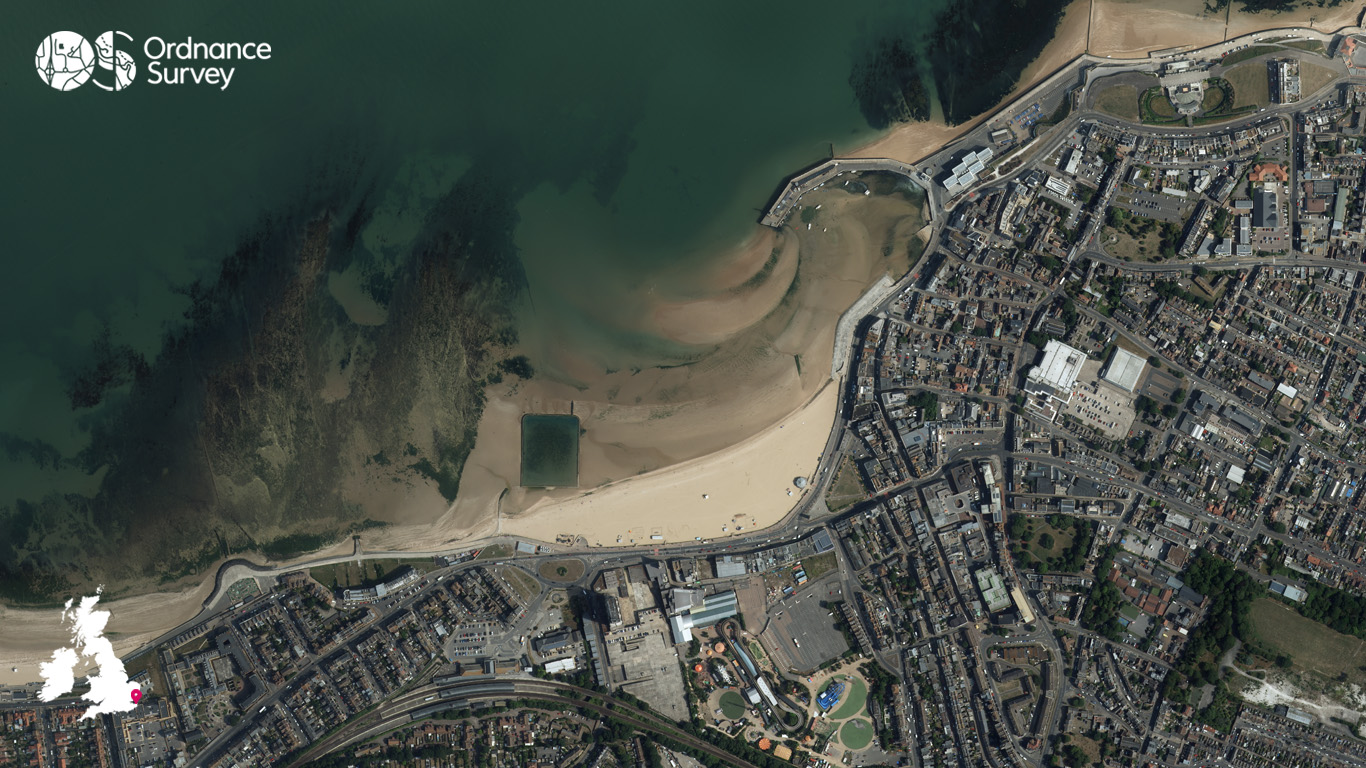
Continuing our aerial photography series this year in celebration of 65 years of flying, March’s wallpaper is of Margate on the southeast coast of England.
A classic seaside town, Margate is known for its iconic wide, golden beach, which has drawn visitors for generations. The beach offers the traditional seaside experience, with swimming, deckchair hire, sandy shoreline walks and ample space for sandcastle-building. The bay is known for its stunning light and its famously beautiful sunsets make evenings along the promenade especially memorable.
For seekers of a bit of culture, the Turner Contemporary, perched right on the waterfront, offers striking sea views alongside its year‑round programme of contemporary art exhibitions. If you’re looking for some fresh air and a dip in the sea, the Walpole Bay Tidal Pool, the largest tidal pool in the UK, offers a unique, sometimes chilly, open‑water swimming experience framed by cliffs and tidal flats.
This imagery of Margate was captured by the OS Flying Unit, which plays a vital role in providing imagery to create many of Ordnance Survey’s products and datasets.
EXPLORE THE
OS Shop
We are with you every step of the way. Shop our trusted walking and hiking maps and guidebooks so you can explore the outdoors with confidence.
Go to the shopContribute to Get Outside!
We’re hoping to bring many more contributors to Get Outside from our own OS Champions but also any of our fans who have interesting routes, pictures and stories of their adventures to share. If you’re interested in writing for us or sharing an adventure with a OS Maps Route then please read this guide – write for Get Outside.
If you have an image you think we could for the next OS Wallpaper join our Facebook Group and share it with us! Just tell us where the image was taken and when.
Free Download: Desktop & Mobile OS Wallpaper Background
2560 x 1440 (also for 2048 x 1152 | 1920 x 1080 | 1600 x 900 | 1536 x 864 | 1366 x 768 |1280 x 720, plus Teams and Zoom)
1920 x 1200 (also for 1680 x 1050 | 1440 x 900 | 1280 x 800)
1366 x 768
1024 x 768 (also for iPad)
1536 x 768: For most mobile and tablet devices. For Android devices more of the image shows as you swipe between screens.
Using the downloaded wallpaper image
To save the image on a computer, right-click (or alt-click) and select ‘save target as’ or the equivalent for your browser. If you are not sure of the screen size, use the largest one.
- For most computers, right click the desktop and select ‘set wallpaper’ to change the wallpaper image.
- For iOS devices, select the image, press and hold on the image to ‘save image’, then go to Photos > Share > Set as Wallpaper.
- On Android devices, select the image, long press to ‘download image’ and then go to Wallpapers > My photos and select the image.
Did you know?
On Windows PCs you can save multiple wallpaper images to a single folder, and have your desktop background automatically change regularly by selecting that folder as the source.
You can also browse all the previous wallpapers.